AV System
Overview
 All AV Components are mounted in the rack in the pool bathroom.
A 2" PVC conduit runs from the rack, across the pool, over to the fireplace where the Panny is mounted.
The heart of the system is the Denon AVR-2807 A/V Amplifier.
All the sources feed into it; it sends an HDMI signal to the 50" Panasonic TV and outputs sounds to all the speakers.
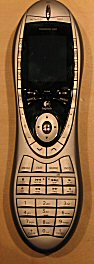 Everything is controlled by a Logitech Harmony 890 remote.
We keep it in the charger on top of the bookshelf in the family room.
This device uses both RF and IR-Repeater technology.
 The remote should turn on when you pick it up.
It should display the Main Activity Screen (like this):
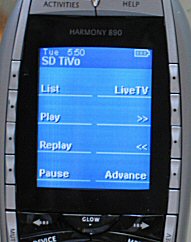 When you select an activity, the window changes to display activity-specific options, like this:
Note that the Activities button toggles between selecting activities and putting up the specific screen for that activity.
- the Volume / Mute buttons are located to left of the round
- To turn everything off, press the "Off" button on the top of the remote.
Please do remember to turn everything off- the plasma TV uses lotsa power..!
Watching TV (Tivo)
Tivo is used for viewing live
TV (via the satellite) and for viewing previously recorded shows.
We have 2 tivos at this point-
1. First select Tivo-HD or Tivo-SD with the remote-
 For live TV
- press the GUIDE button, then use the arrow buttons to navigate around and press SELECT to
watch something.
For previously recorded stuff (the Now Playing list)
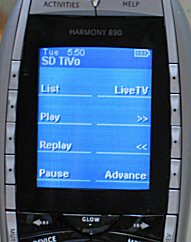
- press the LIST button;
- use the arrow buttons to navigate around to whatever you want to watch;
- press SELECT
Notes-
if you attempt to record something and the tivo tells you it has a conflict with something else,
please ask us before discarding our previous record request.
the tivo should have plenty of room on it- please don't delete anything
Fast Forward and Reverse have 3 speeds- 3x, 20x and 60x. The first time you push it, a 60 second
commercial takes 20 seconds; the second time, it takes 3 second and the
3rd time it takes 1 second.
REPLAY does an 8 second rewind- terrific for seeing a football play again…!
you can PAUSE live tv and use all the fast forward controls (or replay stuff or whatever…)
the VOLUME button on the Tivo works for all audio and video sources.
DVDs
We have a bunch of DVDs in a DVD Jukebox.
First select DVD Player with the remote-
To choose a DVD