| Tivo
operation |
|
|
|
The tivo is used for viewing live
TV (via the satellite) and for viewing previously recorded shows. |
|
After selecting Video1 with the AV System remote- |
|
|
|
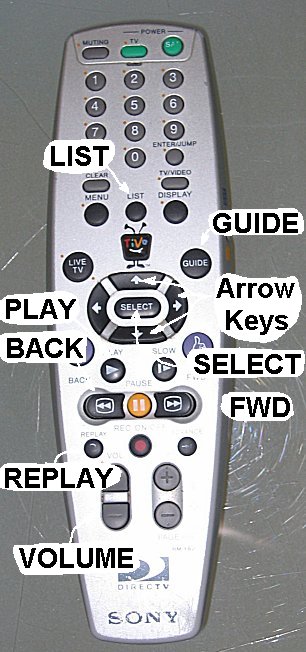 |
For live TV- press the GUIDE
button, then use the arrow buttons to navigate around and press SELECT to
watch something. |
|
For recorded stuff- press the
LIST button, then use the arrow buttons to navigate around to whatever you
want to watch; then press SELECT |
|
Notes- |
|
|
do not use the power buttons on
the tivo controller; it stays powered on all the time. |
|
if you attempt to record
something and the tivo tells you it has a conflict with something else,
please ask us before discarding our previous record request. |
|
the tivo should have plenty of
room on it- please don't delete anything |
|
Fast Forward and Reverse have 3
speeds- 3x, 20x and 60x. The first time you push it, a 60 second
commercial takes 20 seconds; the second time, it takes 3 second and the
3rd time it takes 1 second. |
|
REPLAY does an 8 second rewind-
terrific for seeing a football play again…! |
|
you can PAUSE live tv and use all
the fast forward controls (or replay stuff or whatever…) |
|
the VOLUME button on the Tivo
works for all audio and video sources. |
|
|
|
|
| DVDs |
|
We have a bunch of DVDs in a DVD Jukebox. There's a one page guide to kid's DVD printed on a piece of paper that's either on top of the player or in the display case where the tapes are.
|
|
After selecting LD with the AV System remote- |
|
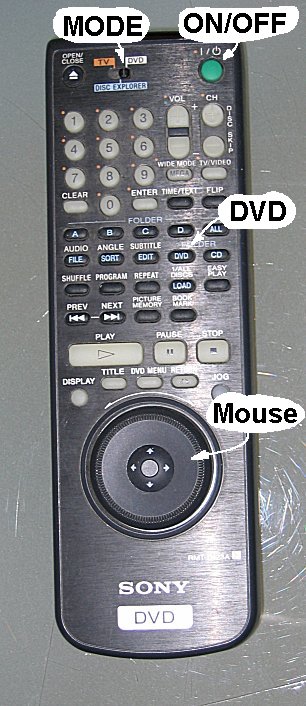 |
Make sure it's started- after you
press LD, you
should see a "Sony DVD" splash screen; if not, press the ON/OFF
button once and wait 10 seconds; repeat until a screen shows up. |
|
Make sure the MODE switch is set
to DVD EXPLORER (the middle position) |
|
Press the DVD button to display a
list of all available DVDs |
|
Use the MOUSE to scroll thru the
list |
|
Press the center of the MOUSE to
select a DVD |
|
Follow the on-screen instructions
to play the disk. |
